Load Balancer Software: A Guide for Growing Businesses
Your promotion is live. Traffic spikes. Checkout slows, then stops. Support gets flooded, your team starts a war room, and someone says, “The servers look fine, but users still can't get through.”
That's the moment many leaders first hear about load balancer software.
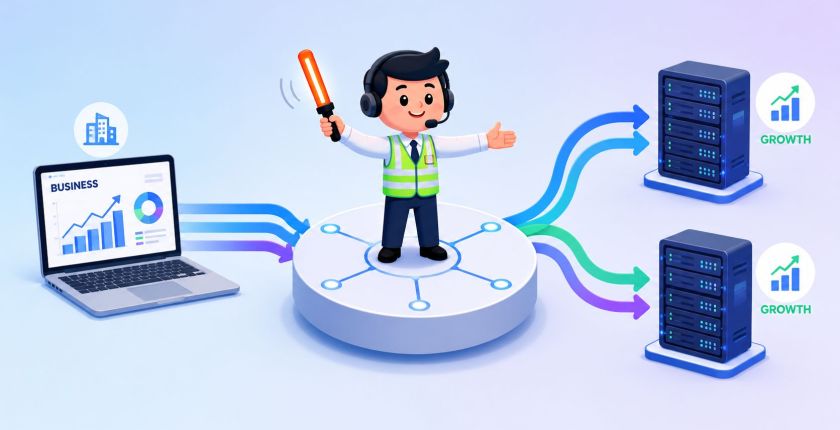
A load balancer is the digital equivalent of a skilled host at a busy restaurant. The host doesn't cook the food. They make sure guests get seated efficiently, no table gets overwhelmed, and the whole room keeps moving. Without that coordination, one server gets slammed while another sits mostly idle, and customers experience the technical version of a long line at the door.
For a CEO, the issue isn't networking theory. It's revenue protection, customer trust, and operational focus. If your application stalls during a launch, a campaign, or a seasonal rush, the business problem is immediate. You lose sales, your brand takes a hit, and your engineers stop building new value because they're busy stabilizing core infrastructure.
Load balancer software sits in the middle of that problem. It routes incoming traffic to the right backend systems, helps keep applications available, and gives teams more control over how requests are handled when demand changes.
The tricky part is that choosing it isn't just a technical purchase. It's a leadership decision. The wrong setup can create hidden admin work, security exposure, and scaling pain long after the initial implementation looks “done.”
Your Website Is Down Now What
When a website goes down, leaders often focus on the visible symptom. The homepage won't load. The cart fails. The app times out. But the underlying issue is usually traffic management.
If all incoming requests hit one server or one application instance without coordination, that system becomes the bottleneck. Even if you have multiple servers available, they won't help much unless something is actively directing work across them.
What's happening behind the scenes
Think of a traffic cop at a crowded intersection.
Cars keep arriving. Some lanes move quickly, others back up. If nobody directs flow, one side gets jammed and the whole intersection starts failing. A load balancer works in a similar way. It receives incoming requests and decides where each one should go.
That decision can be simple or smart.
- Simple routing: Send each new request to the next available server.
- Capacity-aware routing: Send traffic to the server with the fewest active connections.
- Health-aware routing: Stop sending users to a backend that's failing.
- Policy-based routing: Direct requests differently based on application needs.
When customers say “the site is down,” they often mean “the system couldn't distribute demand cleanly.”
Why this matters to a business leader
A crash isn't just a technical outage. It creates second-order problems:
- Sales teams lose momentum: Active campaigns underperform because prospects hit a broken experience.
- Support absorbs the shock: Agents spend time apologizing instead of solving customer issues.
- Engineers get pulled off roadmap work: Product delivery slows because everyone shifts into incident mode.
- Leadership loses confidence in scale: Future launches start feeling risky.
For growing companies, this is often the first sign that infrastructure decisions need executive attention, not just ad hoc fixes.
Load balancing won't solve every outage. Bad code, fragile databases, and dependency failures can still break a system. But if your application serves real users and generates revenue, traffic distribution is one of the first controls you need to get right.
What Is Load Balancer Software and Why It Matters
Load balancer software is the layer that distributes incoming network or application traffic across multiple servers, services, or instances so no single resource gets overloaded.
Definition: Load balancer software helps keep applications available, responsive, and scalable by directing requests to the right backend systems at the right time.
That sounds technical, but the business value is straightforward. It protects uptime, improves the customer experience, and gives your team room to grow without rebuilding your application every time demand increases.

The three business outcomes
Most leaders should think about load balancer software in terms of three outcomes.
- Reliability: If one backend fails, the load balancer can stop sending traffic there and shift requests elsewhere.
- Performance: Work gets spread more evenly, which helps reduce slowdowns caused by overloaded systems.
- Scalability: You can add backend capacity and let the load balancer incorporate it into the traffic flow.
This is why load balancing has become such a central part of modern infrastructure. The market itself reflects that shift. The load balancer market reached $7.09 billion in 2025, up from $6.26 billion in 2024, a 13.3% year-over-year increase, and one forecast projects it will reach $13.79 billion by 2030 at a 14.22% CAGR. In the same market view, software and virtual appliances accounted for 60.3% of the market share in 2024, which shows how important software-based traffic management has become in real production environments, according to this load balancer market analysis.
Why executives should care
This isn't an “IT tool” in the narrow sense. It shapes customer experience.
If your website, app, customer portal, booking system, or internal operations platform handles uneven traffic, load balancing affects how professional your business feels under pressure. Users don't care whether your architecture is elegant. They care whether the page loads, the transaction completes, and the system responds when they need it.
A good load balancing setup also enhances management capabilities. It gives engineering a cleaner way to add capacity, test routing rules, and isolate failures before they become public incidents.
What it doesn't do
It's also important to stay realistic.
Load balancer software doesn't replace application design, observability, security review, or database resilience. It's one critical layer in a wider operating model. When teams treat it as a magic fix, they usually end up disappointed.
The better view is simpler: it's a control point. It helps you manage demand deliberately instead of letting traffic hit your systems in a chaotic way.
The First Big Choice Hardware vs Software Load Balancers
Your first strategic decision is whether to use a dedicated hardware appliance or a software-based load balancer.
For many SMBs, this choice comes down to one question. Do you need a specialized box in your environment, or do you need flexible traffic management that can evolve with the business?

Hardware as a dedicated appliance
A hardware load balancer is like buying a specialized delivery truck built for one job. It can be powerful, purpose-built, and attractive in environments where teams want dedicated infrastructure under tight internal control.
That model still appeals to organizations with established data center practices, strict procurement standards, or existing vendor relationships.
The trade-offs are familiar:
- Higher upfront commitment: You're buying and maintaining a specific appliance, not just deploying software on existing infrastructure.
- Less flexibility: Scaling may require new hardware planning rather than a simple configuration change.
- Vendor dependence: Your roadmap can become tied to one platform's upgrade path and feature model.
Software as a flexible operating layer
Software load balancers work more like a fleet of standard vans. You can deploy them in virtual machines, containers, cloud environments, or hybrid setups. That flexibility is why many modern teams start here.
Examples leaders may hear from their technical teams include HAProxy, NGINX, Traefik, and enterprise platforms such as F5 BIG-IP in software-oriented deployments.
Software brings practical advantages:
- Lower entry friction: Teams can often start without buying dedicated appliances.
- Easier adaptation: Configuration can evolve as the application changes.
- Better fit for cloud growth: Software aligns more naturally with elastic infrastructure and modern deployment models.
Decision rule: If your business changes faster than your infrastructure purchasing cycle, software usually fits better.
A side-by-side business view
| Consideration | Hardware Load Balancers | Software Load Balancers |
|---|---|---|
| Cost profile | More upfront investment | More flexible operating model |
| Scaling style | Often tied to appliance capacity | Easier to expand across environments |
| Change management | Slower, procurement-heavy | Faster to configure and iterate |
| Deployment fit | Traditional data centers | Cloud, hybrid, container, and virtual setups |
| SMB suitability | Sometimes excessive for current needs | Often a better match for growth-stage teams |
That doesn't mean software is automatically simpler. It often shifts cost from procurement to operations. Someone still has to configure policies, maintain certificates, monitor health checks, and troubleshoot routing behavior.
For CEOs, a key insight is this: software usually offers the agility a growing company needs, but only if your team has the operating discipline to run it well.
L4 vs L7 Balancing Explained for Business Leaders
One of the most confusing parts of this topic is the language around Layer 4 and Layer 7. You don't need to memorize networking models to make a good decision, but you do need to understand the difference in business terms.
The simple analogy
Layer 4 is like a postal system sorting envelopes by the address on the outside. It moves quickly because it doesn't inspect the contents.
Layer 7 is like a clerk who reads the letter before deciding which department should handle it. That takes more context, but it allows smarter routing.
In practice, that means a Layer 4 load balancer routes based on connection-level information. A Layer 7 load balancer can look deeper into the request and make decisions based on application-level details such as a URL path, a host name, or other request attributes.
Why smarter routing matters
If you run a modern web application, not all traffic is equal.
A login request, a checkout API call, a static image request, and an admin dashboard action may all deserve different handling. Layer 7 balancing gives teams that finer control.
That's one reason application-aware traffic management has become so important in enterprise environments. In 2024, Layer 7 load balancers held 49.8% of market share, and F5 BIG-IP Platform held over 76% share of the worldwide software market, according to Statista's 2024 load balancer software market-share data.
Layer 4 vs Layer 7 Load Balancing
| Attribute | Layer 4 (Network) | Layer 7 (Application) |
|---|---|---|
| Routing basis | Connection-level details | Application request details |
| Speed profile | Simpler and fast | More context-aware |
| Visibility into requests | Limited | Deeper |
| Traffic decisions | Broad distribution | Granular routing by request type |
| Best fit | Simple, high-volume distribution needs | Web apps with varied user actions and policies |
How to think about the trade-off
Layer 4 is often enough when your application needs straightforward distribution and minimal logic in the traffic layer.
Layer 7 makes sense when the request itself matters.
For example:
- Ecommerce: Route checkout differently from browsing traffic.
- SaaS platforms: Send admin actions to stricter backend policies.
- Multi-service apps: Direct requests to different services based on path or hostname.
Choose Layer 7 when business rules need to shape traffic decisions, not just server availability.
The catch is complexity. More intelligence at the traffic layer can also mean more rules to manage, more room for configuration mistakes, and more need for operational maturity.
Navigating Deployment Models and Cloud-Native Options
After deciding what kind of balancing logic you need, the next question is where it should live. That's where deployment models become a business decision, not just an architecture choice.

On-premises, cloud, or managed
Each model offers a different balance of control and burden.
On-premises
You keep the system inside infrastructure you manage directly.
That can be appealing when your team wants full control over networking, compliance boundaries, and change timing. It also means your team owns more of the maintenance, upgrades, and incident response.
Cloud-native services
You use traffic-management services from your cloud provider and integrate them with the rest of your environment.
This often reduces setup friction and fits well when your workloads already live in cloud platforms. It can also tie your design more closely to one provider's way of doing things.
Fully managed third-party options
You hand off more of the operational burden to an outside platform.
That can be a smart move for lean teams that want reliability without building deep in-house specialization. The trade-off is less direct control over the infrastructure layer.
The hidden strategic question
The harder question isn't just where to deploy load balancer software. It's whether a traditional load balancer is still the right abstraction for every part of your system.
Modern application stacks increasingly use containers, Kubernetes, internal service-to-service communication, API gateways, and service mesh patterns. In those environments, traffic logic can spread across several layers.
As noted in this discussion of open-source load balancers and cloud-native patterns, a key challenge is knowing when load balancers are no longer the right tool. The lines between load balancing, API gateways, and service meshes have blurred, and leaders need to decide whether to keep adding features to the load balancer or adopt cloud-native patterns that reduce manual balancing.
What CEOs should ask
A useful way to frame the decision is with operating questions:
- Where does our application run today: Mostly on-premises, mostly cloud, or mixed?
- How often does our architecture change: Rarely, or every quarter?
- Who owns reliability: A dedicated platform team or a small product engineering group?
- Are we designing for the next year only, or for a broader platform roadmap?
A good answer usually sits inside a broader technology plan. If your company is still deciding how infrastructure, product, and hiring fit together, a clear technology roadmap for growing companies can prevent isolated tool decisions from turning into architecture debt.
An Evaluation Checklist for Choosing Your Software
Most buyers compare feature lists first. That's understandable, but it's not enough. The operational cost of load balancer software often matters more than the initial feature match.
A product can look attractive in a demo and still become a steady source of engineering drag once real applications, certificates, routing rules, and failure scenarios show up.
As explained in this overview of load balancing methods and operational complexity, most guides focus on checklists and miss the hidden cost of operational overhead. For SMBs, the harder question is how much specialist time the team will need to configure, tune, and maintain the system as the stack evolves.
The practical checklist
Use this list when evaluating options such as HAProxy, NGINX, Traefik, cloud-provider services, or enterprise platforms.
- Traffic distribution fit: Does it support the balancing behavior your application needs, such as round robin, least connections, or more policy-driven routing?
- Health checks: Can it reliably detect when a backend should stop receiving traffic?
- TLS and certificate handling: Who owns certificate updates, renewal workflows, and security review?
- Session behavior: If users need sticky sessions or persistence, can the tool handle that cleanly?
- Observability: Will your team be able to see why traffic was routed a certain way when something breaks?
- Change safety: Can engineers test new rules without creating production risk?
- Documentation and support: When an issue appears at night or during a launch, how quickly can your team find trustworthy guidance?
The questions leaders often skip
The bigger risks usually sit outside the product spec sheet.
Ask these in plain business language:
Who will own it?
If the answer is “our lead engineer for now,” you may be underestimating the long-term burden.What happens when traffic or product complexity grows?
A tool that works for one web app may become painful once you add APIs, regions, customer-specific routing, or stricter security needs.What's the actual total cost of ownership?
License price is only one part. Staff time, expertise, incident response, and rule maintenance are often the bigger line items.Does this fit our team's current skill level?
The most feature-rich option isn't automatically the best option.
A good choice is the one your team can operate confidently six months from now, not the one that looks most impressive in procurement.
Tie it back to business metrics
Infrastructure choices should connect to operating goals. If your company already tracks engineering throughput, delivery predictability, and service quality, the decision gets clearer. A useful starting point is defining software development KPIs that actually support decision-making, so infrastructure isn't judged only by technical elegance.
When to Partner with a Fractional Executive
By the time a company is comparing load balancer software seriously, it's usually dealing with a broader leadership issue. Growth is making architecture decisions more expensive.
A founder or CEO starts asking questions that don't fit neatly into a product comparison:
- Are we choosing a tool, or choosing an operating model?
- Does our team have the depth to run this reliably?
- Are we building future flexibility, or just patching the current pain?
- Is this where we want senior engineers spending their time?
Those are executive questions.
A fractional CTO can help translate infrastructure choices into business decisions. That includes evaluating trade-offs, setting priorities, reducing architecture risk, and deciding when to simplify rather than overbuild. For many SMBs, that's more practical than hiring a full-time executive too early.
This model also helps when the need is specific. You may not need a permanent CTO to review traffic architecture, cloud direction, reliability ownership, and vendor choices. You may need experienced guidance for a focused period while the company matures.
If you're weighing that option, this guide to fractional CTO services and tech leadership offers a useful overview of where that role fits.
One practical route is using a marketplace model such as Shiny, which connects companies with fractional executives for part-time leadership needs across functions, including technology leadership.
The right load balancing decision should protect revenue, reduce avoidable operational burden, and support the next stage of growth. If that decision feels bigger than a tool purchase, you're probably seeing the situation clearly.
If your team is making infrastructure decisions that carry leadership-level consequences, Shiny can help you connect with a fractional executive who fits the stage, complexity, and operating needs of your business. A short consultation can clarify whether you need a hands-on technical leader, a strategic advisor, or a more disciplined framework for the next architecture decision.